

5 Best Practice Management Software for South African Accountants in 2026

The 5 best practice management software options for South African accounting firms in 2026. Comparing: Fintura, DataGrows, GreatSoft, SmartPractice and InfoDocs across CIPC automation, Xero integration, pricing and practice management scope.
On this page
- Looking for the best practice management software for South African accounting firms?
- What should SA accounting firms look for in practice management software?
- How do the five platforms compare?
- 1. Fintura
- What Fintura covers
- Key outcomes
- Pricing
- 2. DataGrows
- Key features
- Pricing
- 3. GreatSoft
- Key features
- Pricing
- 4. SmartPractice
- Key features
- Pricing
- 5. InfoDocs
- Key features
- Pricing
- Frequently asked questions
The verdict. For a South African accounting firm that wants to run its practice and its compliance in one place, Fintura is the strongest choice: Practice Management from R299 per user a month, with deadline tracking, time and billing, client onboarding and engagement letters, and CIPC filings executed in-platform. DataGrows suits firms that need audit management. GreatSoft suits large firms that want income tax returns in the same suite.
The right practice management software helps South African accounting firms handle CIPC compliance, track billable hours and manage client workflows without switching between multiple tools. This guide reviews the five most relevant platforms available in 2026: Fintura, DataGrows, GreatSoft, SmartPractice and InfoDocs. We looked at CIPC integration depth, Xero compatibility, pricing transparency and practice management scope, so you don't have to.
You'll see how they compare and why Fintura is the strongest all-in-one option for firms managing ten or more client entities.
Here are our top three picks:
| Tool | Best for |
|---|---|
| Fintura | SA accounting firms that need CIPC automation, practice management and Xero billing in one platform |
| DataGrows | SA accounting and audit firms that need practice management, workflow automation and SARS/CIPC deadline tracking in one place |
| GreatSoft | Established practices prioritising traditional practice management over compliance automation |
Looking for the best practice management software for South African accounting firms?
South African accounting firms face a compliance environment that most practice management tools weren't built for. Between CIPC annual returns, beneficial ownership filings, SARS deadlines and growing client books, firms that rely on manual portals and disconnected spreadsheets are burning hours they can't bill for.
The right software helps you:
- File CIPC annual returns, beneficial ownership declarations and company registrations directly in-platform, without manual portal logins
- Track every billable minute against compliance tasks and push invoices directly to Xero
- Manage your full client portfolio from one dashboard with tasks, deadlines, documents and custom-branded engagement letters
- Onboard your client book directly from the CIPC registry, whether that is 10 entities or 1,000
- Eliminate compliance penalties through automated deadline tracking and reminders
“Fintura has become the backbone of our CIPC compliance delivery. Our whole team runs CIPC Compliance Services through Fintura compliance workflows and we're now using Practice Management to assign work, track deadlines and keep every client on schedule.”

What should SA accounting firms look for in practice management software?
Before evaluating any tool, check these four criteria. Most SA firms that buy the wrong software discover the gaps only after onboarding their client book.
- Direct CIPC filing, not just tracking: guided wizards for annual returns, beneficial ownership and company registrations, executed in-platform. Not deadline reminders pointing you back to the manual portal.
- Full practice management scope: client onboarding, task management, time tracking, billing and reporting in one place. Every additional tool in your stack adds admin overhead and increases the risk of things falling through.
- Xero integration that goes beyond export: the integration should push time and billing entries directly into invoices, not rely on CSV exports or manual reconciliation steps.
- Transparent pricing and local support: if you need to request a quote before seeing a price, budget for surprises. Support that understands CIPC, annual returns and SA-specific compliance saves time when issues arise.
How do the five platforms compare?
Price and unit, SARS work, CIPC filing and the free trial, on the same terms for every tool. Competitor figures are as each vendor's own site stated them on the date shown.
| # | Tool | Price and unit | SARS | CIPC filing | Free trial | Best for |
|---|---|---|---|---|---|---|
| 1 | Fintura | Practice Management starts from R299 per user a month; Compliance from R35 per entity; Tax from R29 per taxpayer | VAT201 and EMP201 submitted from Fintura; AI SARS correspondence | 45+ CIPC services filed in-platform | 30 days | Firms that want practice management, CIPC filing and SARS work in one platform |
| 2 | DataGrows | From R399 per user a month (Starter); In Control R549 (October 2026) | A SARS connection for IRP6 and correspondence on In Control | Deadline tracking and share registers; no in-platform filing | 30 days | Firms that want audit management and one price per user |
| 3 | GreatSoft | Not published; a consultation first (October 2026) | Income tax returns and IRP6 through SARS eFiling | Not in-platform | None stated | Large firms that want income tax returns in the same suite |
| 4 | SmartPractice | Not published (October 2026) | Bulk provisional tax through DreamTax, a separate product | Secretarial records; filing on the CIPC portal | None stated | Established practices comfortable with modular software |
| 5 | InfoDocs | From R649 per company a year (Flexi) or from R2,300 a month (Fixed), July 2026 | None | Annual returns and beneficial ownership filed in-platform | A free pay-as-you-go tier | Business owners managing their own company records |
Here is how each one stacks up in 2026.
1. Fintura
Full practice OS: CIPC automation, tax, task management, time tracking and Xero billing.

Fintura is purpose-built practice management, compliance and tax software for South African accounting firms, used by 150+ firms managing 7,000+ entities. For firms evaluating alternatives to Xero's limited CIPC compliance capability, or looking to replace manual CIPC portal workflows, Fintura is purpose-built for the SA compliance environment, covering CIPC, SARS and DOL in a single platform.
It handles 45+ CIPC services through guided wizards for annual returns, beneficial ownership filings, company registrations, share transactions and director changes, all executed in-platform without manual portal logins. Bulk entity onboarding imports your client book, whether 10 entities or 1,000, directly from the CIPC registry. Visual organograms automate beneficial ownership declarations. Time tracked against compliance tasks pushes directly into Xero invoices with one click.
For accounting firms managing from ten to several hundred client entities, Fintura replaces the fragmented combination of Xero, CIPC eServices and spreadsheets with one unified system.
What Fintura covers
Practice Management runs the firm: its clients, its team's work, its deadlines, its time and its engagement letters. Compliance and Tax add the CIPC and SARS work to the same workspace, so the deadline and the filing sit in one place.
- Practice task and deadline management: a Kanban board with automated deadline tracking across your full client portfolio, CIPC, SARS and the firm's own. Assign, track and complete in one view.
- Time tracking and billing: time recorded against each client's work flows into invoices in Xero, Sage, QuickBooks or Zoho, so billable hours are not lost between the task and the invoice.
- Client onboarding: onboarding forms and automation, with company details filled in from the CIPC registry.
- Custom-branded engagement letters: generate professionally branded engagement letters with your firm identity and capture client e-signatures in-platform.
- Automate CIPC filings (45+ services): guided wizards for annual returns, director changes, share transactions and more, with legally-valid e-signatures and a full audit trail. No manual CIPC portal logins required.
- Bulk CIPC entity onboarding: import your entire client book directly from the CIPC registry with validation, whether that is 10 entities or 1,000. No spreadsheets, no manual data capture.
- Beneficial ownership filing: visual organograms map complex shareholding structures and generate all required CIPC beneficial ownership documents automatically.
- Tax with AI SARS correspondence: VAT and PAYE submissions from the same workspace, and incoming SARS letters read automatically into tasks with deadlines.
Key outcomes
| Outcome | |
|---|---|
| 50% | Less manual data entry |
| 10 hours | Saved per accountant per week |
| R18,000+ | Unbilled revenue recovered per firm per month |
Pricing
Three modules, priced independently: Practice Management per user, Compliance Automation per entity and Tax per taxpayer. Each can be used on its own or mixed to match what each client needs.
Practice Management, per user per month
| Tier | Price | Includes |
|---|---|---|
| Essentials | R299 | Full workspace management, client management and basic workflow management |
| Pro | R499 | Everything in Essentials, plus billing integration, timekeeping, and client onboarding forms and automation |
| Expert | R599 | Everything in Pro, plus full engagement creation and sending from the platform |
Compliance Automation, per entity per month
| Tier | Price | Includes |
|---|---|---|
| Track | R35 | Full visibility of annual returns, beneficial ownership and CIPC change history, with automated reminders as filings come due or anything changes on CIPC |
| Manage | R55 | Everything in Track, plus annual returns and beneficial ownership filings with the service fee included, compliance checklists, the full shareholding suite (share classes, certificates, BO diagram and mapping), statutory registers, document generation, e-signing and trust management |
| Submit | R95 | Everything in Manage, plus Fintura service fees waived on every compliance service apart from new registrations, including company and director changes, SARS, COIDA and UIF services. Statutory fees still apply |
Tax, per taxpayer per month
| Tier | Price | Includes |
|---|---|---|
| Track | R29 | Every taxpayer's SARS correspondence in the platform, workflows with deadlines and tasks created from it, the Tax Compliance Dashboard, statements and payments |
| Submit | R79 | Everything in Track, plus in-platform submissions for VAT or PAYE |
| All In | R99 | Everything in Submit, plus both VAT and PAYE submissions, including bulk submission |
Every Tax tier includes AI SARS correspondence, which reads incoming SARS letters and creates tasks with deadlines automatically.
Pros
- The only SA tool combining end-to-end CIPC execution with full practice management
- Direct Xero billing push. No double entry, no lost billable hours
- Flexible pricing: per user, per entity, per taxpayer, or pay-as-you-go compliance
- Transparent pricing published online, a 30-day free trial and self-serve onboarding
- Clean, intuitive interface. Easy to pick up without extensive training
Cons
- More expensive than basic compliance-only tools
- More than you need if you only require secretarial for a single entity
Best for: accounting firms managing ten or more client entities who want one platform for compliance, practice management and billing.
Want to see how it works? Book a free demo and bring your entity list.
2. DataGrows
Practice management for SA accountants and auditors, with SARS/CIPC deadline tracking rather than direct filing.
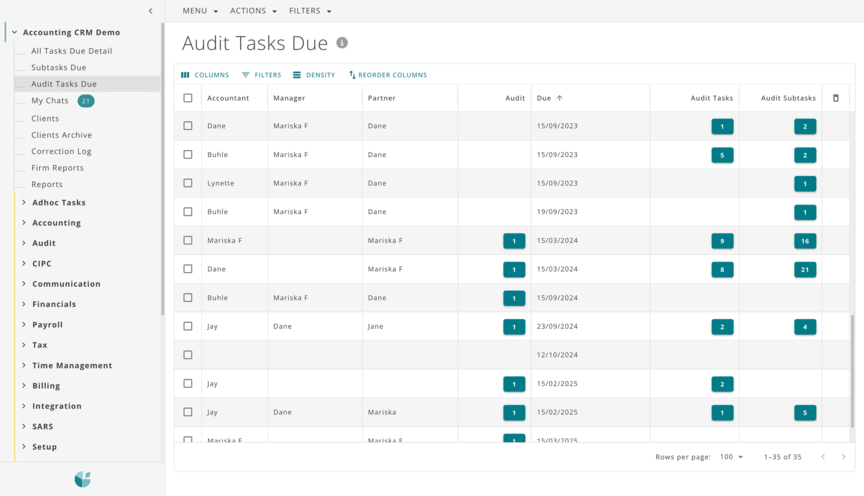
DataGrows is a practice management platform built for South African accounting and audit firms, covering task management, timekeeping, billing, team collaboration and SARS/CIPC deadline tracking.
Key features
- Automated task and workflow management with audit tracking
- SARS and CIPC deadline tracking with real-time status visibility
- Beneficial ownership document generation
- Timekeeping, billing and team collaboration tools
- Xero integration via the timekeeping and billing module
Pricing
Per user, per month, in rand: Starter from R399 and In Control at R549, with a custom Fast-Track plan for large practices, as of October 2026 on datagrows.co.za. In Control adds billing, CIPC compliance and share registers, audit planning and a SARS connection for IRP6 and correspondence. A 30-day free trial is available.
Pros
- Strong automated task and workflow management for SA practices
- Published per-user pricing, with a lot included in the In Control plan
- Audit management module, useful for firms doing both accounting and audit
- SARS and CIPC deadline tracking with day counters
- 30-day free trial available
- Xero integration available
Cons
- No direct CIPC filing. Submissions still require manual CIPC portal logins
- No e-signatures or engagement letter generation in-platform
- No bulk CIPC entity onboarding from the CIPC registry
- Less suitable for firms prioritising compliance execution over practice workflow
Best for: SA accounting and audit firms that need strong practice workflow management and SARS/CIPC deadline tracking, and are comfortable filing CIPC submissions manually.
3. GreatSoft
Practice management first, with limited native CIPC filing capability.
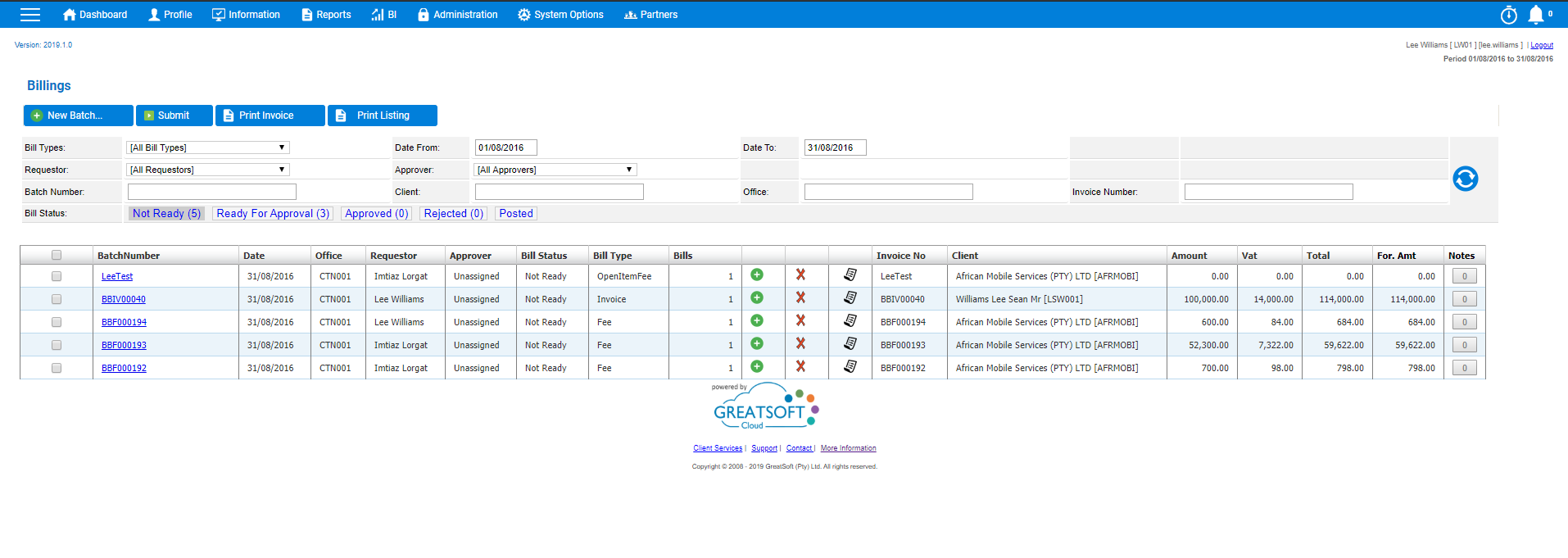
GreatSoft is a well-established South African practice management suite with a broad range of modules covering CRM, document management, tax, payroll and secretarial. It brings a depth of features suited to complex, multi-service practices.
Key features
- Centralised client and staff management (CRM) across all service lines
- Integrated billing, general ledger, creditors and asset ledger
- Document management, tax, payroll and secretarial modules
- Workflow and work-in-progress (WIP) planning tools
- Custom reporting and financial statement generation
Pricing
Not publicly listed. Custom pricing on request, typically enterprise-tier.
GreatSoft is a strong platform for large, established firms that need a comprehensive enterprise suite across multiple service lines. For small to medium SA accounting practices focused on CIPC compliance automation and cost-effective practice management, the pricing structure and implementation overhead make it a heavier commitment than most firms at that scale require. Direct in-platform CIPC filing is not a core feature, and submissions still require manual portal logins or third-party workarounds.
Pros
- Comprehensive enterprise suite covering CRM, billing, tax, payroll, secretarial and document management in one platform, including income tax returns through SARS eFiling
- Deep modular coverage, suited to large, multi-service practices with complex workflows
- Long track record in South African practice management
- Xero and Sage integration
- Strong reporting and financial statement generation capabilities
Cons
- Pricing not publicly listed. Typically enterprise-tier, which puts it out of reach for most SMB practices
- No self-serve free trial stated
- No direct CIPC filing. Submissions still require manual portal logins or third-party workarounds
- Implementation overhead and onboarding complexity better suited to large firms with dedicated IT resources
- No e-signatures or engagement letter generation in-platform
Best for: large, established accounting firms with enterprise budgets that need a comprehensive multi-module suite across all service lines.
4. SmartPractice
Modular practice management. SecSmart tracks secretarial records, but there is no direct CIPC filing.
SmartPractice is a modular cloud-based practice management platform built for South African accountants, which says it is used by over 290 accounting practices.
Key features
- Modular suite: PlanSmart (task planning), TimeSmart (time and billing), SecSmart (company secretarial), DocShareSmart (document sharing), DebtorSmart and ClientSmart (bulk comms)
- Beneficial ownership management and trust administration via SecSmart
- DreamTax integration for bulk provisional tax submissions via SARS eFiling
- Mobile app (SmartApp) for on-the-go time tracking and disbursements
- Xero and Sage direct integration, plus batch import for Pastel Partner and QuickBooks
Pricing
Not publicly listed.
Pros
- Long-established, with a large base of South African practices
- Modular design lets firms pick only the modules they need
- Mobile app (SmartApp) for time tracking on the go
- Beneficial ownership and trust administration tracking via SecSmart
- Xero, Sage, Pastel Partner and QuickBooks integration
Cons
- No direct CIPC filing. SecSmart tracks records, but submissions still require manual CIPC portal logins
- No e-signatures or engagement letter generation in-platform
- Pricing not publicly listed
- No self-serve free trial stated
Best for: SA accounting practices that want a modular, per-client practice management suite with time tracking and secretarial, and are comfortable filing CIPC submissions manually.
5. InfoDocs
Company secretarial and CIPC compliance. Not a practice management platform.
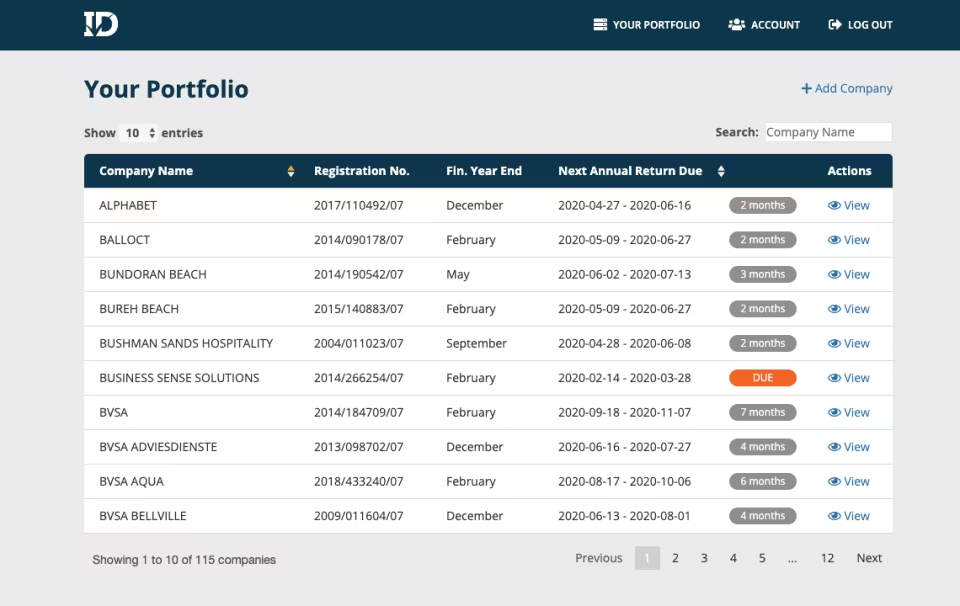
InfoDocs is a company secretarial and CIPC compliance platform, not a practice management tool. It handles CIPC annual returns, share registers, beneficial ownership filings, director changes and company registrations.
Key features
- CIPC annual returns, beneficial ownership filings, director changes and company registrations submitted in-platform
- Share register management with automated certificates, minutes and resolutions
- Import companies directly from the CIPC registry by name or registration number
- 75+ professional document templates drafted by lawyers
- Annual return reminders and company alert notifications
- Access management with edit or view-only permissions per company or portfolio
Pricing
- Free tier (pay as you go): unlimited companies, annual return reminders and share certificates. CIPC transactions are charged individually
- Professional subscription: per-company pricing with partner discounts. Includes free CIPC transactions (excluding CIPC and card fees), 75+ templates and portfolio exports
Pros
- Strong CIPC submission capability for individual companies
- Free tier available for business owners, with pay-as-you-go CIPC transactions
- Professional templates drafted by lawyers: share certificates, minutes, resolutions
- Direct company import from the CIPC registry. No manual data capture
- Simple, focused interface for company secretarial tasks
- Partner discounts available for professionals managing multiple companies
Cons
- Not a practice management tool. No time tracking, task management, staff allocation or integrated billing
- No Xero or accounting software integration
- No engagement letter generation or e-signatures
- Per-company subscription pricing becomes expensive at scale for firms managing large client portfolios
- Single-entity workflow. Not designed for accounting practices managing fifty or more client entities at once
Best for: business owners and company secretaries managing their own CIPC compliance, rather than accounting practices needing full practice management.
Frequently asked questions
Direct answers to what South African accounting practice owners are searching for in 2026.
What is the best practice management software for South African accounting firms?+
Fintura for firms that want a full practice operating system with direct CIPC automation, time tracking and integrated Xero billing in one platform. DataGrows for firms that prioritise practice workflow management, audit management and SARS/CIPC deadline tracking, and are comfortable handling CIPC filings manually via the portal. The right choice depends on whether direct in-platform CIPC filing is a firm requirement, or whether deadline tracking and document generation is sufficient.
Which software automates CIPC compliance for accountants in South Africa?+
Two tools execute CIPC submissions directly in-platform:
- Fintura: 45+ CIPC services via guided wizards, bulk entity onboarding, and beneficial ownership with visual organograms, all filed in-platform without touching the CIPC portal
- InfoDocs: company secretarial submissions for single entities, not designed for multi-client accounting practices
DataGrows and SmartPractice track CIPC deadlines and generate supporting documents, but actual submissions still require manual CIPC portal logins. GreatSoft typically requires third-party add-ons for CIPC functionality.
What is the difference between Fintura and DataGrows?+
Fintura combines direct CIPC filing with full practice management, while DataGrows focuses on practice workflow and deadline tracking without in-platform CIPC submissions. Fintura executes 45+ CIPC services through guided wizards, pushes billing directly to Xero, and offers bulk entity onboarding from the CIPC registry. DataGrows provides strong task automation, audit management, and SARS/CIPC deadline tracking with day counters, but CIPC filings still require manual portal logins. Fintura starts from R299 per user per month with a 30-day free trial. DataGrows starts from R399 per user per month on Starter, with a 30-day free trial (October 2026). Both integrate with Xero.
What is the difference between Fintura and InfoDocs?+
They solve different problems for different users. Fintura is a full practice management platform for accounting firms managing portfolios of client entities, combining CIPC automation, task management, time tracking, billing and Xero integration. InfoDocs is company secretarial software designed for business owners managing their own company records. It is not a practice management tool: it has no time tracking, no task management, no staff allocation, no integrated billing and no Xero integration. If you run an accounting practice, Fintura is built for your workflow. If you are a business owner managing your own CIPC compliance, InfoDocs may be sufficient.
How much does accounting practice management software cost in South Africa?+
Pricing ranges from free to enterprise-tier depending on the tool and the model:
- Fintura Practice Management: R299 to R599 per user per month (Essentials to Expert), with a 30-day free trial
- Fintura Compliance Automation: R35 to R95 per entity per month (Track to Submit), plus a pay-as-you-go option
- Fintura Tax: R29 to R99 per taxpayer per month (Track to All In), with AI SARS correspondence on every tier
- DataGrows: from R399 per user per month on Starter, R549 on In Control, 30-day free trial available (October 2026)
- SmartPractice: not publicly listed
- GreatSoft: enterprise-tier pricing, not publicly listed, custom quote on request
- InfoDocs: free tier with pay-as-you-go CIPC transactions, or a per-company professional subscription with partner discounts
For what a firm pays in practice, including a five-person firm worked out by tier and the costs a quote often leaves out, read what practice management software costs for South African accountants.
Which practice management tools handle beneficial ownership filing in South Africa?+
Fintura is the only practice management platform that files beneficial ownership declarations directly to CIPC in-platform, using visual organograms to map complex ownership structures across client portfolios. InfoDocs supports beneficial ownership management for individual companies but is not a practice management tool. DataGrows generates beneficial ownership documents but does not file them to CIPC, so submissions still require manual portal logins. SmartPractice tracks beneficial ownership records via the SecSmart module but does not submit directly. GreatSoft does not offer native beneficial ownership filing.
Firms running their practice on Fintura today:
- 150+ South African accounting firms
- 7,000+ entities managed
- 20,000+ deadlines automated
- 0 compliance penalties
Not ready for a demo? Run a free CIPC health report on your client book first.
Keep reading

Annual fee reviews: how to build your software costs into client fees
A coffee shop never charges you for the espresso machine: it is in the price of the cup. Here is how to build Fintura into your fees at your annual review, which costs are your firm's overhead, which belong to each client, and why CIPC's fees stay disbursements.
Read moreWhat practice management software costs for South African accountants
Practice management software for a South African accounting firm is priced per user, per month. Here is what Fintura's three tiers cost and include, what a five-person firm pays monthly and annually, the costs a quote often leaves out, and how other practice management tools price.
Read more



VAT201 returns for every client: how accounting firms prepare, approve and submit in bulk
An accounting firm does not file one VAT201. It files one per VAT-registered client, from different ledgers, due on the same day. Here is how a firm prepares, gets approval, submits, loads payment and sends receipts for every client's VAT201 in one run, with the SARS due dates and categories as a reference.
Read morePut the reading into practice.
Start for free in minutes, or book a demo to see Fintura on your own portfolio.
